A-Star Algorithm
Interactive A* path planner for grid navigation with obstacle placement and route replay
Algorithms
# features
What It Does
Core capabilities of the A-Star path planning system.
A* Path Planning
Computes shortest paths on a dynamic grid using heuristic-based search.
Interactive Controls
Set start/end points, paint obstacles, and launch live route calculations.
Path Validation
Validates and visualises each computed step with clear state feedback and messages.
Grid Resizing
Adjust grid dimensions at runtime to test algorithm behaviour on different planning resolutions.
Path Cost Diagnostics
Tracks algorithm iteration costs and highlights when heuristic costs lead to faster route convergence.
# source
Project Source Code
Explore the primary logical modules.
EXPLORER
srcgui.py
1import sys2from PyQt5 import QtGui3from PyQt5.QtWidgets import (4 QApplication,5 QMainWindow,6 QVBoxLayout,7 QHBoxLayout,8 QLabel,9 QWidget,10 QPushButton,11 QLineEdit,12 QScrollArea,13)14from PyQt5.QtGui import (15 QPen,16 QFont,17 QIntValidator,18 QPainter,19 QResizeEvent,20)21from PyQt5.QtCore import Qt, QPoint, QTimer22import math23import importlib24import pathPlanner252627class MainWindow(QMainWindow):28 def __init__(self, *args, **kwargs):29 super().__init__(*args, **kwargs)30 self.layout = QVBoxLayout()31 self.title = "AMR Coursework 2 - Path Planning"32 self.top = 20033 self.left = 50034 self.width = 60035 self.height = 50036 self.obstacle_mode = False # Flag to indicate if obstacle mode is on37 self.start_mode = False # Flag to indicate if start mode is on38 self.end_mode = False # Flag to indicate if end mode is on39 self.start_set = False # Flag to indicate if start has been set40 self.end_set = False # Flag to indicate if end has been set41 self.grid_dimensions = [20, 10]42 self.checked_path = []4344 self.init_window()45 # Container widget to position widgets46 self.container_widget = QWidget()47 self.container_widget.setLayout(self.layout)48 self.setCentralWidget(self.container_widget)4950 def init_window(self):51 self.setWindowTitle(self.title)52 self.setGeometry(self.left, self.top, self.width, self.height)5354 self.draw_console(self.layout)5556 self.canvas = CanvasWidget(self)57 self.layout.addWidget(self.canvas)5859 self.draw_control_panel(self.layout)6061 def draw_console(self, parentLayout):62 console_layout = QHBoxLayout()6364 self.message_display = ScrollableLabel(self)65 self.message_display.setText("")66 self.message_display.setMaximumHeight(80)6768 self.clear_button = QPushButton("CLEAR")69 self.clear_button.setStyleSheet("QPushButton { background-color: white }")70 self.clear_button.clicked.connect(self.on_click_clear)7172 self.indicator = QLabel("")73 self.indicator.setStyleSheet("QLabel { background-color : grey; }")74 self.indicator.setMinimumWidth(40)75 self.indicator.setMaximumHeight(40)7677 console_layout.addWidget(self.message_display)78 console_layout.addWidget(self.clear_button)79 console_layout.addWidget(self.indicator)80 parentLayout.addLayout(console_layout)8182 def draw_control_panel(self, parentLayout):83 control_panel_layout = QHBoxLayout()84 self.width_input = LabelledIntField("Width", 2, self.grid_dimensions[0])85 self.height_input = LabelledIntField("Height", 2, self.grid_dimensions[1])86 self.width_input.show() # Widget dimensions are not set until it is shown8788 self.reset_button = QPushButton("Reset")89 self.reset_button.setStyleSheet("QPushButton { background-color: white }")90 self.reset_button.setMaximumHeight(self.width_input.height())91 self.reset_button.clicked.connect(self.on_click_reset)9293 self.obstacle_button = QPushButton("Add\nObstacles")94 self.obstacle_button.setStyleSheet("QPushButton { background-color: white }")95 self.obstacle_button.setMaximumHeight(self.width_input.height())96 self.obstacle_button.clicked.connect(self.on_click_obstacle)9798 self.obstacle_undo_button = QPushButton("Undo\nObstacle")99 self.obstacle_undo_button.setStyleSheet(100 "QPushButton { background-color: white }"101 )102 self.obstacle_undo_button.setMaximumHeight(self.width_input.height())103 self.obstacle_undo_button.clicked.connect(self.on_click_obstacle_undo)104105 self.start_button = QPushButton("Add\nStart")106 self.start_button.setStyleSheet("QPushButton { background-color: white }")107 self.start_button.setMaximumHeight(self.width_input.height())108 self.start_button.clicked.connect(self.on_click_start)109110 self.end_button = QPushButton("Add\nEnd")111 self.end_button.setStyleSheet("QPushButton { background-color: white }")112 self.end_button.setMaximumHeight(self.width_input.height())113 self.end_button.clicked.connect(self.on_click_end)114115 self.run_button = QPushButton("Run")116 self.run_button.setStyleSheet("QPushButton { background-color: white }")117 self.run_button.setMaximumHeight(self.width_input.height())118 self.run_button.clicked.connect(self.on_click_run)119120 control_panel_layout.addWidget(self.width_input)121 control_panel_layout.addWidget(self.height_input)122 control_panel_layout.addWidget(self.reset_button)123 control_panel_layout.addWidget(self.obstacle_button)124 control_panel_layout.addWidget(self.obstacle_undo_button)125 control_panel_layout.addWidget(self.start_button)126 control_panel_layout.addWidget(self.end_button)127 control_panel_layout.addStretch(1)128 control_panel_layout.addWidget(self.run_button)129130 control_panel_layout.setSpacing(2)131 parentLayout.addLayout(control_panel_layout)132133 def resizeEvent(self, e: QResizeEvent):134 self.canvas.draw_grid(self.grid_dimensions[0], self.grid_dimensions[1])135136 def keyPressEvent(self, event):137 if event.key() == Qt.Key_R:138 self.reset()139140 def reset(self):141 self.grid_dimensions = (142 self.width_input.get_value(),143 self.height_input.get_value(),144 )145 self.display_message(146 "Resetting grid to {} x {}".format(147 self.grid_dimensions[0], self.grid_dimensions[1]148 ),149 "INFO",150 )151 self.indicator.setStyleSheet("QLabel { background-color : grey; }")152 self.canvas.draw_grid(self.grid_dimensions[0], self.grid_dimensions[1])153 self.canvas.obstacles = []154 self.canvas.path = None155 self.start_set = False156 self.canvas.start = None157 self.start_set = False158 self.canvas.end = None159160 def on_click_clear(self):161 self.message_display.setText("")162163 def on_click_reset(self):164 self.reset()165166 def on_click_obstacle(self):167 self.obstacle_mode = not self.obstacle_mode168169 self.start_mode = False170 self.start_button.setStyleSheet("QPushButton { background-color: white }")171 self.end_mode = False172 self.end_button.setStyleSheet("QPushButton { background-color: white }")173174 self.obstacle_button.setStyleSheet(175 "QPushButton { background-color: %s }"176 % ("grey" if self.obstacle_mode else "white")177 )178179 def on_click_obstacle_undo(self):180 if len(self.canvas.obstacles) > 0:181 self.canvas.path = None182 self.indicator.setStyleSheet("QLabel { background-color : grey; }")183 self.canvas.obstacles.pop()184 self.canvas.update()185186 def on_click_start(self):187 self.start_mode = not self.start_mode188189 self.obstacle_mode = False190 self.obstacle_button.setStyleSheet("QPushButton { background-color: white }")191 self.end_mode = False192 self.end_button.setStyleSheet("QPushButton { background-color: white }")193194 self.start_button.setStyleSheet(195 "QPushButton { background-color: %s }"196 % ("green" if self.start_mode else "white")197 )198199 def on_click_end(self):200 self.end_mode = not self.end_mode201202 self.start_mode = False203 self.start_button.setStyleSheet("QPushButton { background-color: white }")204 self.obstacle_mode = False205 self.obstacle_button.setStyleSheet("QPushButton { background-color: white }")206207 self.end_button.setStyleSheet(208 "QPushButton { background-color: %s }"209 % ("red" if self.end_mode else "white")210 )211212 def on_click_run(self):213 if not self.start_set or not self.end_set:214 self.display_message("Start and End must be set", "WARN")215 self.indicator.setStyleSheet("QLabel { background-color : red; }")216 return217218 self.display_message("Running algorithm", "INFO")219 try:220 importlib.reload(pathPlanner)221 grid = self.create_grid()222223 print("grid=", end='')224 print(grid)225 print("start=", end='')226 print(self.canvas.start)227 print("end=", end='')228 print(self.canvas.end)229230 unchecked_path = pathPlanner.do_a_star(231 grid,232 self.canvas.start,233 self.canvas.end,234 self.display_message,235 )236 except Exception as e:237 self.display_message('Python: "{}"'.format(str(e)), "ERROR")238 self.indicator.setStyleSheet("QLabel { background-color : red; }")239 return240241 if len(unchecked_path) == 0:242 self.display_message("No path returned", "ERROR")243 self.indicator.setStyleSheet("QLabel { background-color : red; }")244 return245 else:246 for cell in unchecked_path:247 if not self.check_inside_grid(cell):248 self.indicator.setStyleSheet("QLabel { background-color : red; }")249 return250 if self.check_obstacle_intersection(cell):251 self.indicator.setStyleSheet("QLabel { background-color : red; }")252 break253 self.indicator.setStyleSheet("QLabel { background-color : green; }")254255 if self.canvas.start in unchecked_path:256 unchecked_path.remove(self.canvas.start)257 if self.canvas.end in unchecked_path:258 unchecked_path.remove(self.canvas.end)259260 if len(unchecked_path) > 0:261 self.display_message("Drawing path", "INFO")262 self.checked_path = unchecked_path263264 self.canvas.path = []265 self.system_timer = QTimer()266 self.system_timer.setInterval(267 int(1000 / len(self.checked_path))268 ) # Convert to milliseconds269 self.system_timer.timeout.connect(self.animate_path)270 self.system_timer.start()271272 def check_inside_grid(self, cell):273 if (274 cell[0] < 0275 or cell[0] >= self.grid_dimensions[0]276 or cell[1] < 0277 or cell[1] >= self.grid_dimensions[1]278 ):279 self.display_message("Path outside grid", "ERROR")280 return False281 return True282283 def check_obstacle_intersection(self, cell):284 if cell in self.canvas.obstacles:285 self.display_message("Path intersects obstacle", "WARN")286 return True287 return False288289 def create_grid(self):290 grid = [291 [1 for x in range(self.grid_dimensions[1])]292 for y in range(self.grid_dimensions[0])293 ]294 for obstacle in self.canvas.obstacles:295 grid[obstacle[0]][obstacle[1]] = 0296 return grid297298 def animate_path(self):299 if len(self.checked_path) > 0 and self.canvas.path != None:300 self.canvas.path.append(self.checked_path.pop(0))301 self.canvas.update()302 else:303 self.system_timer.stop()304305 def display_message(self, message, type="DEBUG"):306 message = "[{}] {}".format(type, message)307 if type == "DEBUG":308 self.message_display.appendBlueText(message)309 elif type == "ERROR":310 self.message_display.appendRedText(message)311 elif type == "INFO":312 self.message_display.appendBlackText(message)313 elif type == "WARN":314 self.message_display.appendOrangeText(message)315 else:316 return317 self.message_display.scrollToTop()318319320class CanvasWidget(QWidget):321 def __init__(self, parent=None):322 super().__init__(parent)323 self.parent = parent324 self.setMinimumSize(500, 300)325 self.setAutoFillBackground(True)326 self.setPalette(QtGui.QPalette(QtGui.QColor(255, 255, 255)))327 self.mouse_pressed = False328 self.grid = []329 self.obstacles = []330 self.path = None331 self.start = None332 self.end = None333 self.cell_width = 0334 self.cell_height = 0335 self.column_offset = 0336 self.row_offset = 0337338 def draw_grid(self, columns, rows):339 self.grid = []340 width = self.width()341 height = self.height()342 self.cell_width = math.floor(width / columns)343 self.column_offset = math.floor(344 (width % self.cell_width) / 2345 ) # Used to center the grid346 self.cell_height = math.floor(height / rows)347 self.row_offset = math.floor(348 (height % self.cell_height) / 2349 ) # used to center the grid350 for x in range(0, columns + 1):351 xc = x * self.cell_width352 self.grid.append(353 (354 xc + self.column_offset,355 self.row_offset,356 xc + self.column_offset,357 rows * self.cell_height + self.row_offset,358 )359 )360361 for y in range(0, rows + 1):362 yc = y * self.cell_height363 self.grid.append(364 (365 self.column_offset,366 yc + self.row_offset,367 columns * self.cell_width + self.column_offset,368 yc + self.row_offset,369 )370 )371 self.update()372373 def mousePressEvent(self, event):374 if event.button() == Qt.LeftButton:375 self.mouse_pressed = True376377 if self.parent.start_mode:378379 # Remove the path and reset the indicator380 self.path = None381 self.parent.indicator.setStyleSheet(382 "QLabel { background-color : grey; }"383 )384385 start_pos = event.pos()386 start_cell = self.get_selected_cell(start_pos)387 if (388 start_cell not in self.obstacles389 and start_cell != self.end390 and start_cell[0] >= 0391 and start_cell[0] < self.parent.grid_dimensions[0]392 and start_cell[1] >= 0393 and start_cell[1] < self.parent.grid_dimensions[1]394 ):395 self.start = start_cell396 self.parent.start_set = True397 self.update()398 elif self.parent.end_mode:399400 # Remove the path and reset the indicator401 self.path = None402 self.parent.indicator.setStyleSheet(403 "QLabel { background-color : grey; }"404 )405406 end_pos = event.pos()407 end_cell = self.get_selected_cell(end_pos)408 if (409 end_cell not in self.obstacles410 and end_cell != self.start411 and end_cell[0] >= 0412 and end_cell[0] < self.parent.grid_dimensions[0]413 and end_cell[1] >= 0414 and end_cell[1] < self.parent.grid_dimensions[1]415 ):416 self.end = end_cell417 self.parent.end_set = True418 self.update()419420 def mouseMoveEvent(self, event):421 if self.mouse_pressed:422 if self.parent.obstacle_mode:423424 # Remove the path and reset the indicator425 self.path = None426 self.parent.indicator.setStyleSheet(427 "QLabel { background-color : grey; }"428 )429430 obstacle_pos = event.pos()431 obstacle_cell = self.get_selected_cell(obstacle_pos)432 if (433 obstacle_cell not in self.obstacles434 and obstacle_cell != self.start435 and obstacle_cell != self.end436 and obstacle_cell[0] >= 0437 and obstacle_cell[0] < self.parent.grid_dimensions[0]438 and obstacle_cell[1] >= 0439 and obstacle_cell[1] < self.parent.grid_dimensions[1]440 ):441 self.obstacles.append(obstacle_cell)442 self.update()443444 def mouseReleaseEvent(self, event):445 if event.button() == Qt.LeftButton:446 if self.parent.obstacle_mode:447448 # Remove the path and reset the indicator449 self.path = None450 self.parent.indicator.setStyleSheet(451 "QLabel { background-color : grey; }"452 )453 obstacle_pos = event.pos()454 obstacle_cell = self.get_selected_cell(obstacle_pos)455 if (456 obstacle_cell not in self.obstacles457 and obstacle_cell != self.start458 and obstacle_cell != self.end459 and obstacle_cell[0] >= 0460 and obstacle_cell[0] < self.parent.grid_dimensions[0]461 and obstacle_cell[1] >= 0462 and obstacle_cell[1] < self.parent.grid_dimensions[1]463 ):464 self.obstacles.append(obstacle_cell)465 self.mouse_pressed = False466 self.update()467468 def paintEvent(self, event):469 painter = QPainter(self)470 pen = QPen()471 pen.setWidth(2)472 pen.setColor(Qt.black)473 painter.setPen(pen)474475 for obstacle in self.obstacles:476 painter.fillRect(*self.cell_to_coords(obstacle), Qt.black)477478 if self.start:479 painter.fillRect(*self.cell_to_coords(self.start), Qt.green)480 if self.end:481 painter.fillRect(*self.cell_to_coords(self.end), Qt.red)482483 if self.path:484 for cell in self.path:485 if cell not in self.obstacles:486 painter.fillRect(*self.cell_to_coords(cell), Qt.blue)487 else:488 painter.fillRect(*self.cell_to_coords(cell), Qt.gray)489490 for line in self.grid:491 painter.drawLine(*line)492493 def get_selected_cell(self, pos):494 return (495 math.floor((pos.x() - self.column_offset) / self.cell_width),496 math.floor((pos.y() - self.row_offset) / self.cell_height),497 )498499 def cell_to_coords(self, obstacle_cell):500 return (501 obstacle_cell[0] * self.cell_width + self.column_offset,502 obstacle_cell[1] * self.cell_height + self.row_offset,503 self.cell_width,504 self.cell_height,505 )506507508class LabelledIntField(QWidget):509 def __init__(self, title, max_length, initial_value=None):510 QWidget.__init__(self)511 layout = QVBoxLayout()512 self.setLayout(layout)513514 self.label = QLabel()515 self.label.setText(title)516 self.label.setFont(QFont("Arial", weight=QFont.Bold))517 layout.addWidget(self.label)518519 self.lineEdit = QLineEdit(self)520 self.lineEdit.setValidator(QIntValidator())521 self.lineEdit.setMaxLength(max_length)522 if initial_value != None:523 self.lineEdit.setText(str(initial_value))524 layout.addWidget(self.lineEdit)525 layout.setContentsMargins(0, 0, 0, 0)526527 def set_label_width(self, width):528 self.label.setFixedWidth(width)529530 def set_input_width(self, width):531 self.lineEdit.setFixedWidth(width)532533 def get_value(self):534 return int(self.lineEdit.text())535536537class ScrollableLabel(QScrollArea):538539 def __init__(self, *args, **kwargs):540 QScrollArea.__init__(self, *args, **kwargs)541542 self.setWidgetResizable(True)543 content = QWidget(self)544 self.setWidget(content)545546 layout = QHBoxLayout(content)547548 self.label = QLabel(content)549550 self.label.setAlignment(Qt.AlignLeft | Qt.AlignTop)551552 self.label.setWordWrap(True)553554 layout.addWidget(self.label)555 self.setHorizontalScrollBarPolicy(Qt.ScrollBarAlwaysOff)556 self.setVerticalScrollBarPolicy(Qt.ScrollBarAlwaysOn)557558 def setText(self, text):559 self.label.setText(text)560561 def appendBlackText(self, text):562 self.label.setText(text + "<br>" + self.label.text())563564 def appendRedText(self, text):565 self.label.setText(566 "<font color='Red'>" + text + "</font> " + "<br>" + self.label.text()567 )568569 def appendGreenText(self, text):570 self.label.setText(571 "<font color='Green'>" + text + "</font> " + "<br>" + self.label.text()572 )573574 def appendBlueText(self, text):575 self.label.setText(576 "<font color='Blue'>" + text + "</font> " + "<br>" + self.label.text()577 )578579 def appendOrangeText(self, text):580 self.label.setText(581 "<font color='Orange'>" + text + "</font> " + "<br>" + self.label.text()582 )583584 def scrollToBottom(self):585 self.verticalScrollBar().setValue(self.verticalScrollBar().maximum())586587 def scrollToTop(self):588 self.verticalScrollBar().setValue(self.verticalScrollBar().minimum())589590591app = QApplication(sys.argv)592app.setStyle("Fusion")593w = MainWindow()594w.show()595w.canvas.draw_grid(w.grid_dimensions[0], w.grid_dimensions[1])596597sys.exit(app.exec_())# simulation
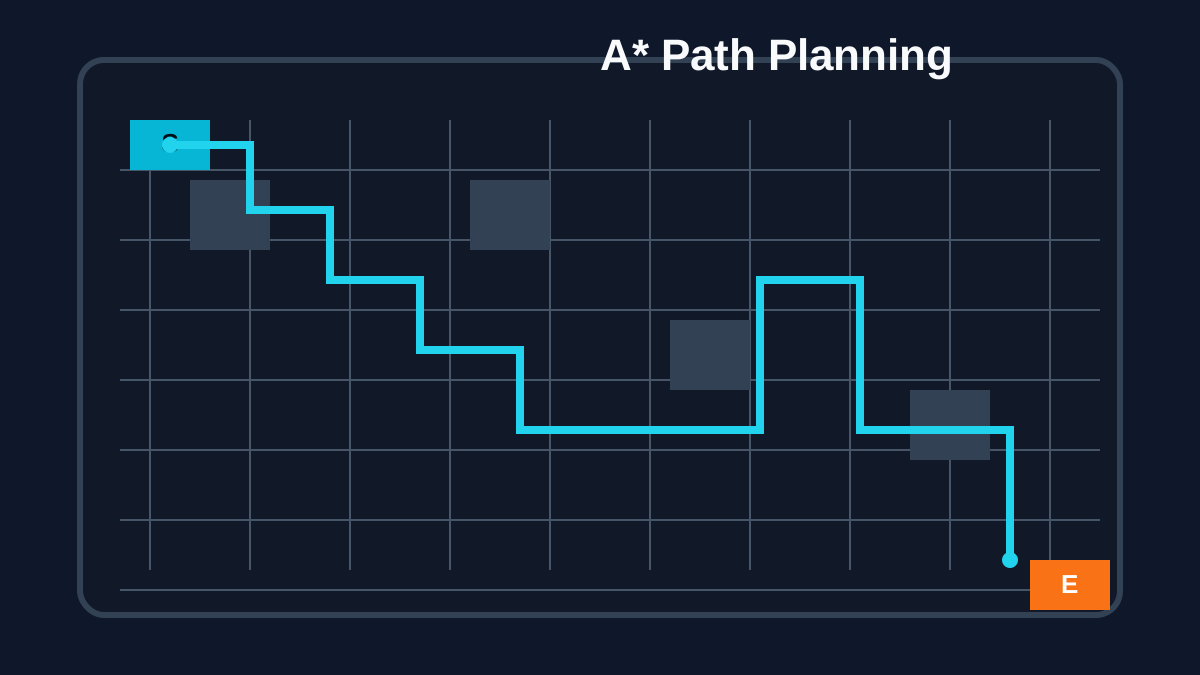
A* Path Planner Simulation
Interactive A-star visualization for obstacle-aware routing.
No messages yet.
# repositories
Source Code
GitHub repositories for this project.
A-Star Algorithm Repository
Access the complete source code on GitHub.
Quick Start
$ git clone https://github.com/prathapselvakumar/AMR-Coursework-2
$ cd AMR-Coursework-2
$ python -m venv .venv
$ . .venv/bin/activate
$ pip install -r requirements.txt
$ python a_star_algorithm.py